COR

Capture what's real. Forecast what's possible.

Talk through or upload any process. COR returns a documented SOP and a visual process map, then scores the forecasted gain across cost, labor hours, quality risk and worker burden before you commit to a change.

What it does

Most operations have never seen their own processes end to end. The way the work actually gets done lives in heads, habits, and a binder nobody opens. COR captures how the work actually gets done, talk it, type it, or drop in a file, and turns it into two governed artifacts: the SOP and a step-level visual process map.

COR is the process improvement application inside OpCor. Beyond the SOP and the process map, it scores the process against a forecast on cost, labor hours, quality risk (an 8-factor matrix), and worker burden (a 6-factor matrix) before anything changes. Assess every process you run and the portfolio view lists them by forecasted gain, highest first, so the biggest opportunity sits at the top.

Then you refine. COR's Builder lets you adjust the process model, the forecast, the improvement plan, and the completeness review conversationally, with file grounding and a preview of each proposed change before you accept it. Reports assemble the stored process data into a document. Improvement initiatives are artifacts of record that move through draft, submit, approve, the same governed pattern the SOP uses.

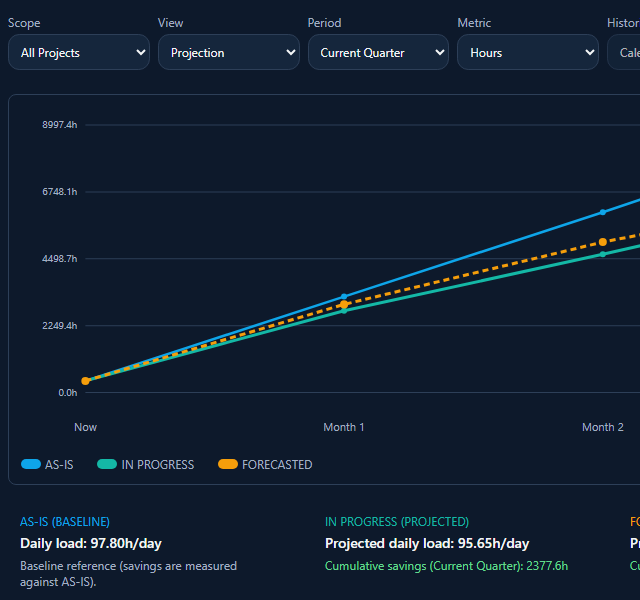
Three lines track daily labor load now, with planned changes, and forecast, rising over the coming months.

How it works

  1. 01

    Capture the process

    Type it, speak it into the Builder once a draft is loaded, or upload a PDF, CSV, XLSX, XLS, DOC, DOCX, TXT or JSON file.

  2. 02

    Structure the input

    AI organizes your description into a governed SOP that follows a fixed nine-section template.

  3. 03

    Review the process map

    A visual process map shows the process steps, decision points, and handoffs by department and role.

  4. 04

    Review step-level detail

    Drill into any step to review the tool, owning department, responsible role, and time estimate. AI proposes these from the process description. You review and refine.

  5. 05

    See the impact forecast

    COR scores the process across four dimensions: cost, labor hours, quality risk (an 8-factor matrix), and worker burden (a 6-factor matrix).

  6. 06

    Refine in the Builder

    Open the side-panel Builder to adjust the process model, the forecast, or the improvement plan. Text or file input, with a preview of each change before you accept it.

  7. 07

    Publish

    The approved SOP is filed in Library as a document of record and generates a draft digital form for an admin to review.

Use cases

Process standardization across projects

A utility contractor runs the same maintenance procedure across 12 substations, but each crew does it slightly differently. COR captures the senior Technician's description, structures it into a single governed SOP, and scores the process against the 8-factor quality-risk matrix and the 6-factor worker-burden matrix. The standardized procedure is filed in Library, ready for field reference.

Compliance-ready process documentation

A water treatment facility needs documentation for an upcoming audit. COR ingests their existing paper procedures (uploaded as PDFs), structures them into the governed nine-section format, and produces documentation with control checkpoints and a compliance flag on each step.

Process improvement with impact modeling

An industrial maintenance team suspects their current PM routine is over-maintaining some assets and under-maintaining others. COR captures the current process and scores the forecasted change in cost, labor hours, quality risk and worker burden. The team refines iteratively in the Builder before committing the new procedure.

AI capabilities

Multimodal input

Text, PDF, CSV, or an uploaded document. Describe a process the way that's natural to you.

SOP generation

AI generates a draft SOP from freeform input, structured into a fixed nine-section format. You edit and approve before publishing.

Process map generation

AI generates a visual process map showing steps, decision points, and handoffs by department and role. You review and adjust before the map becomes authoritative.

Forecasted improvement initiatives

AI scores forecasted gains across four dimensions: cost, labor hours, quality risk (8-factor matrix), and worker burden (6-factor matrix). Every initiative is an artifact of record that moves through draft, submit, approve.

Conversational Builder

Side-panel refinement for the process model, the forecast and the improvement plan. File-grounded. Preview each change, accept or dismiss, before it applies.

Step-level detail inference

For any process step, AI proposes the tool used, owning department, responsible role, and a time estimate. Review and refine before these become part of the governed SOP.

File grounding

Attach reference documents to Builder conversations. COR uses them as context for refinement.

Value and integration

What you gain

  • ▸One governed SOP per process.
  • ▸Cost, labor hours, quality risk, and worker burden, scored before you commit to a change.
  • ▸Every process you run, listed by forecasted gain, highest first.
  • ▸A visual process map showing steps, decision points, and handoffs by department and role.
  • ▸Step-level detail: the tool, the owning department, the responsible role, and a time estimate for each step.
  • ▸Changes to the process model or forecast staged as a preview before you accept them.
  • ▸An approved SOP filed in Library as a document of record, with a draft digital form generated for admin review.

How COR connects to OpCor

  • ▸Library: Every published SOP becomes a durable document of record in Library, replacing the previous version.
  • ▸Flow: When a work order is created, OpCor proposes the matching approved SOP as its procedure.

See COR running

Tell us what you want to see in COR and pick a time that works for you. On the call we listen to your questions, then show you OpCor running on what you picked.